
Finance & Invoicing

Invoices, costs,
accounting: all included.

Create invoices, record vehicle costs, track payment status: all directly in Swivex. Customer name, vehicle, and prices are applied automatically. Your accounting system runs in the background.
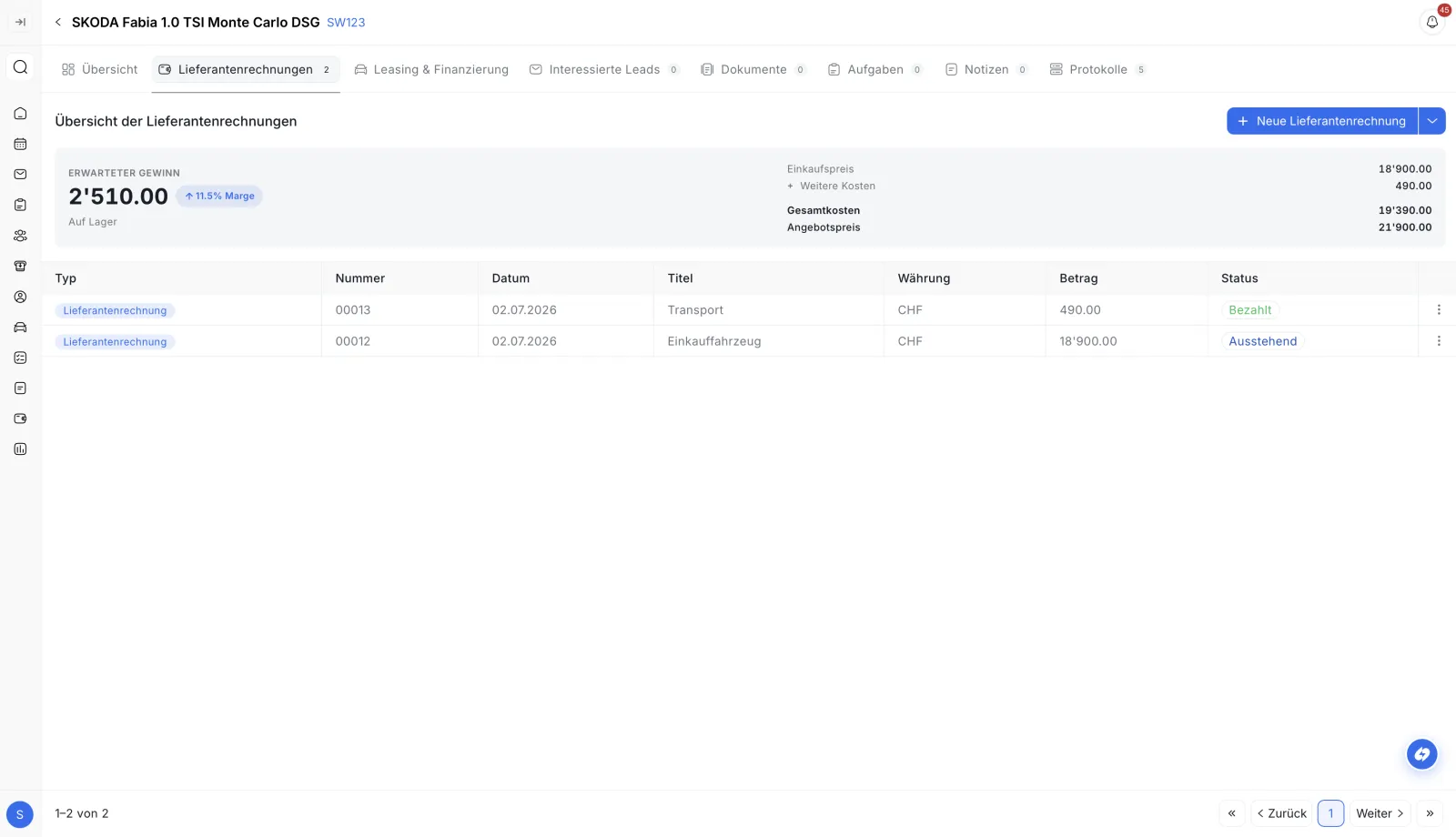

Digital invoices Vehicle costs Accounting sync Cost overview
Per-vehicle cost overview in the Swivex dealership software – purchase, reconditioning and margin at a glance
Results with Swivex

What your finances achieve with Swivex

Invoices in seconds, automatically synced with Bexio or Abacus, without double entry and without typing errors.

0%Efficiency

Create an invoice: data is already there.

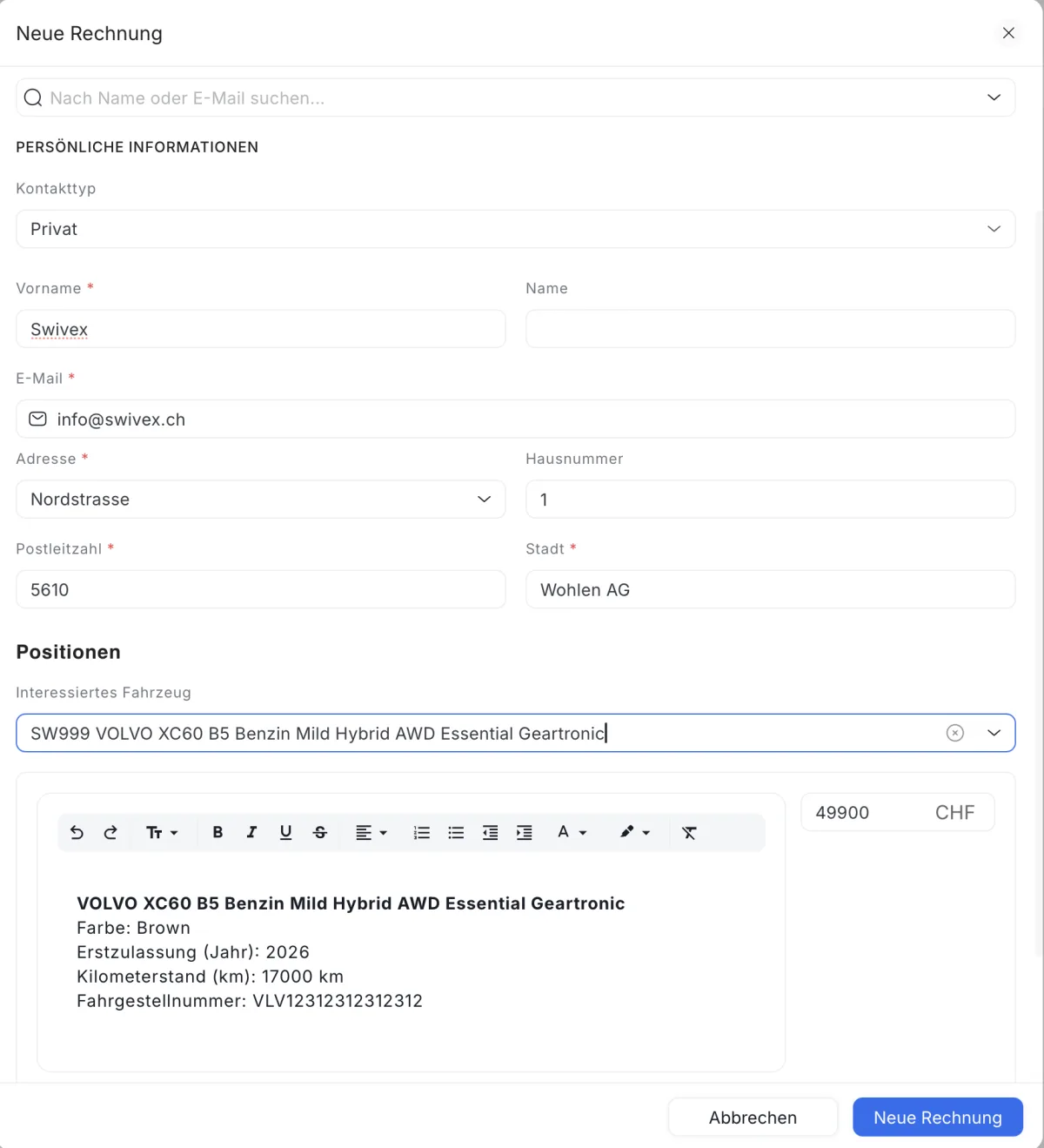
Customer name, vehicle, and price are automatically applied. For leasing, Swivex detects the bank. The invoice is created in a few clicks and sent to your accounting system.

0%Cost control

Record costs directly with the vehicle.

Purchase, repair, transport, preparation: record costs and receipts directly in Swivex with the vehicle, assign account codes. Everything is automatically synced to your accounting system.

0%Automation

One system. Accounting runs in the background.

Record invoices and costs in Swivex, the sync with your accounting system happens automatically via the API. No system switching, no double entry.

No more system switching?

Invoices and costs,
directly in Swivex.

Free demo: We'll show you how to record invoices and vehicle costs in Swivex with your accounting system synced automatically. No commitment.

No setup fee Personal onboarding Swiss support
Avg. time savings
−80%
less effort. Invoices and costs
directly in Swivex, accounting in the background
100%Digital
AutoSync
Digital invoices

Create an invoice.
Data is already there.

Customer name, vehicle, and price are automatically applied. For leasing, Swivex detects the responsible bank. The invoice is created in a few clicks and sent to your accounting system.

Track payment status, mark as paid, all directly in Swivex, without switching between systems. No Word, no Excel, no double entry.
PDF sending
Accounting sync
Correct VAT
Create an invoice in the Swivex dealership software – customer and vehicle data prefilled automatically
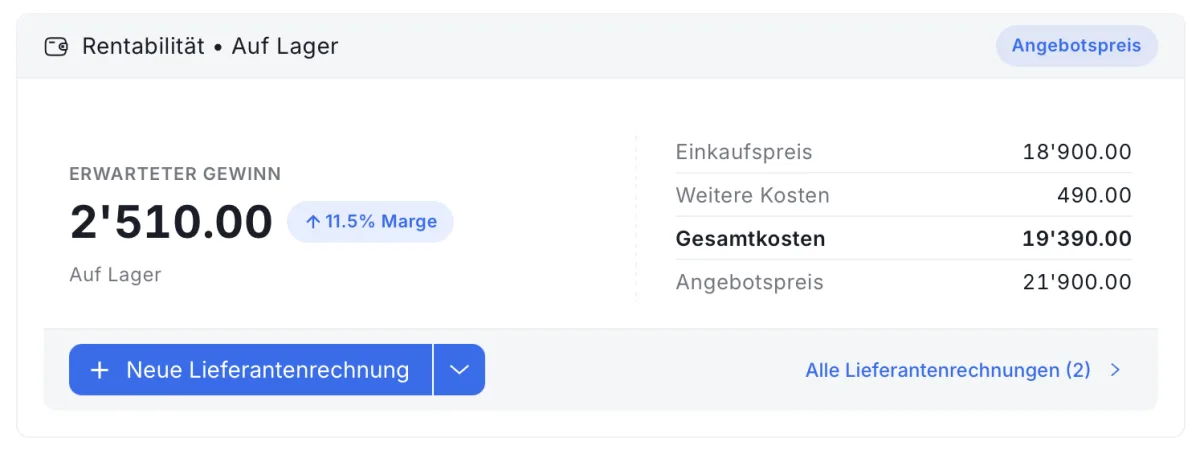
Cost overview and profitability per vehicle in the Swivex dealership software – costs, margin and profit at a glance
What you handle in Swivex

Invoices and costs,
directly with the vehicle.

No system switching, no double entry. Accounting runs in the background.

  • Create invoices directly in Swivex. Customer name, vehicle, and price are applied automatically
  • For leasing, Swivex detects the responsible bank, no manual lookup
  • Record vehicle costs and receipts with the vehicle, assign account codes
  • Track payment status and mark invoices as paid
  • Everything is automatically synced with your accounting system via the API
−80%effort

Record invoices and costs where your vehicles and customers already are. Accounting runs in the background, no system switching needed.

Why Swivex Finance

One system.
No switching.

Manage invoices and costs where your vehicles and customers already are. Accounting runs in the background.

Data applied automatically

Customer name, vehicle, and price are filled in automatically. For leasing, Swivex detects the responsible bank. No typing, no errors.

Costs with the vehicle

Purchase, repair, transport, preparation: record costs and receipts directly with the vehicle and assign account codes. Everything is synced to your accounting system.

Accounting in the background

Via the API, invoices and costs are automatically synced with your accounting system. Accounting runs where it belongs, without double entry.

Costs at a glance

All vehicle costs at a glance, right next to the listing. So you instantly see what a vehicle costs, without switching to the accounting program.

Accounting integration

Swivex up front.
Accounting in the background.

You work in Swivex, your accounting system handles the accounting. Via the API, invoices and costs are automatically synced.

Swivex ↔ Accounting

Record invoices and costs in Swivex. Your accounting system is automatically synced via the API and handles all accounting.

Invoices→ Swivex → Accounting

Create invoices in Swivex. Customer data, vehicle, and price are applied automatically. The invoice is sent to the accounting system.

Vehicle costs→ With the vehicle

Record costs and receipts directly with the vehicle in Swivex and assign account codes. Everything is synced to the accounting system.

API sync→ Accounting

Your accounting system handles accounting in the background. No double entry, no discrepancies. System and accounting always match.

FAQ

Frequently Asked Questions

Everything you need to know about finance & invoicing with Swivex.

Directly with the vehicle or lead: customer name, vehicle, and price are applied automatically. For leasing, Swivex detects the responsible bank. The invoice is created in a few clicks and automatically sent to your accounting system.
In the accounting program, you have to type in all data by hand. In Swivex, customer name, vehicle, price, and for leasing the bank are filled in automatically. No switching between systems, no typos, no double effort.
All costs related to the vehicle: purchase price, repair, transport, preparation, inspection, and more. You record the costs and receipts directly with the vehicle in Swivex and assign the appropriate account codes. Everything is synced to the accounting system.
Swivex is connected to your accounting system via an API. Invoices and vehicle costs that you record in Swivex are automatically transmitted. All accounting runs in your accounting system. Swivex is the convenient interface for your daily work.
Yes. Directly in Swivex, you can see whether an invoice is created, sent, or paid. You can mark invoices as paid, all without having to switch to the accounting program.
No. Accounting runs entirely in your accounting system. Swivex is the interface where you create invoices and record costs, conveniently and directly with the vehicle. Everything is automatically transmitted via the API.
Yes. All recorded costs (purchase, repair, transport, preparation) are displayed directly with the vehicle. So you see at a glance what a vehicle costs, without switching to the accounting program.
When recording costs and receipts, you can specify the account code directly in Swivex. This is transmitted together with the amount to the accounting system, so the booking is correctly assigned.
Currently Swivex supports Bexio and Abacus. Additional accounting systems can be connected on request. The finance features require a connection to an accounting system.